

With SAP Business One ERP, you are getting an integrated software system and management solution with inventory stock, warehousing and distribution capabilities. We are based in Kenya and able to provide local support with a strong certified team that has domain knowledge and strong experience in deploy solutions for Kenyan companies taking into consideration Kenyan statutory requirements and other obligations.
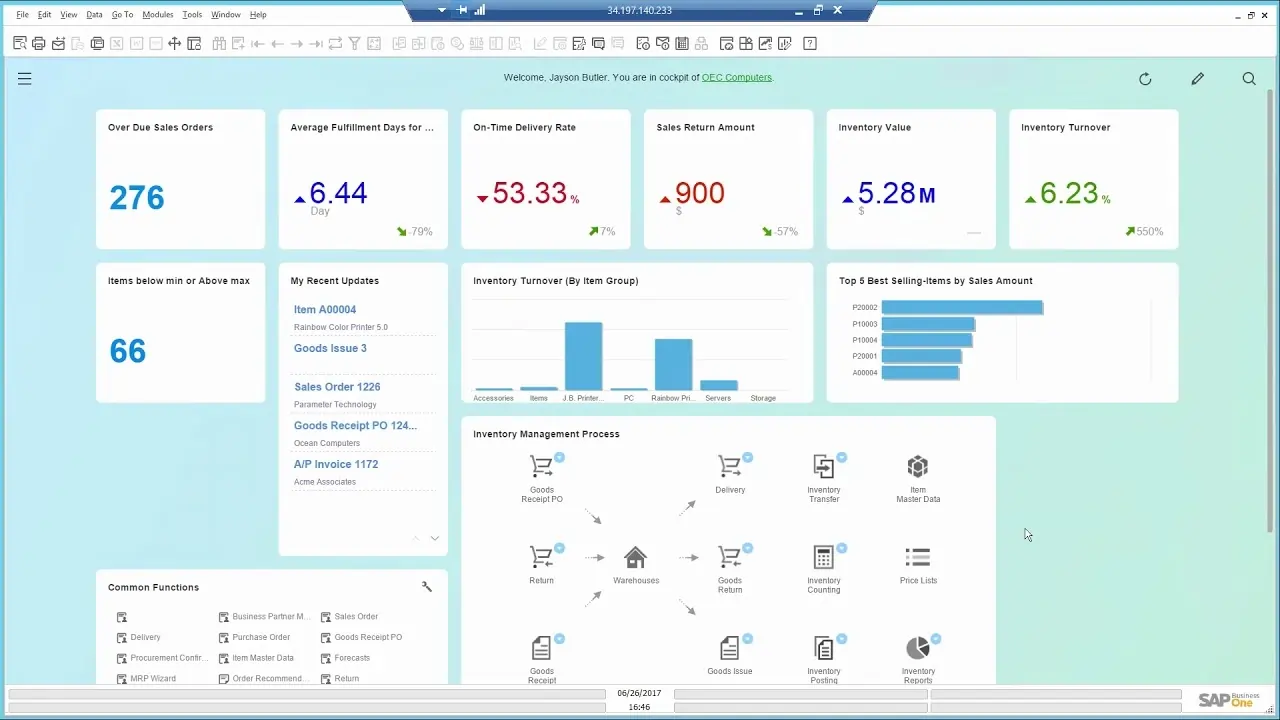
Watch a Demo on inventory stock, warehousing and distribution capabilities in SAP Business One ERP
SAP Business One provides accurate information about inbound and outbound shipments, inventory stock and item warehouse location. You can value inventory stock using standard costing,
moving average, FIFO, and other methods; monitor stock levels; and track stock transfers in real time. You can run realtime inventory stock updates and availability checks and manage standard and special pricing. You can also apply volume, cash, and customer discounts and run reports that reveal their impact.
manage inventory stock per warehouse using various costing models, maintain item master data, and use multiple units of measure and pricing.
manage inventory stock in multiple warehouses, by dividing each one into multiple subzones, set up inventory allocation rules, optimize inventory stock movement, and reduce picking times.
record goods receipts and issues inventory movement; track stock locations and inventory transfers; enable consignment, drop-ship, and other orders; and perform inventory and cycle counts.
create and maintain multilevel bills of materials (BOMs), issue and release production orders manually or by backflush, and globally maintain prices for BOMs.
generate reports (for inventory and warehouse) with timely data and display them in various formats or dashboards.
Stock and warehousing ERP (Enterprise Resource Planning) software is a business management tool that integrates warehouse management, inventory control, and other core business functions into a single system. Unlike a standalone Warehouse Management System (WMS), an ERP offers a comprehensive, real-time view of a business by connecting warehouse operations with finance, sales, purchasing, and manufacturing.
Good Stock and Warehousing ERP solutions optimise workflow by automating processes and sorting your operations data in real time – so your team members are always working from the most up-to-date information. This means less administrative work for your employees, allowing them to focus on nurturing relationships, delivering excellent, personalised customer service, and exploring new leads.
Stock and Warehousing ERP software can also generate in-depth, actionable analytics, that you can leverage to assess progress and adjust your strategy going forward.
There are significant differences between cloud-based Stock and Warehousing ERPs and on-premise Stock and Warehousing ERPs. In the on-premise Stock and Warehousing ERP model, a business hosts and operates servers and networks in physical locations, which house their customer database. Often, companies use this option because they are using legacy systems that were set up decades ago. Another reason could be because they operate in places where Internet is unavailable or unreliable.
Compared to cloud-based Stock and Warehousing ERPs, on-premise Stock and Warehousing ERP requires significant upfront costs to install because it is built from scratch on-location, rather than already tapping into an existing Stock and Warehousing ERP infrastructure. On-premise Stock and Warehousing ERP software also requires that a company hire and oversee ongoing personnel management to maintain the system. Additionally, unlike cloud-based Stock and Warehousing ERP, on-premise systems occasionally require internal IT resources or an outside team, to take the system off-line to implement updates. In addition to the costs involved, there is often time lost since employees who use the system cannot access it.
For these reasons, moving forward with a cloud-based Stock and Warehousing ERP usually leads to faster set-up, lower costs, less disruption and downtime for maintenance.
SAP Business One is the best selling ERP software system in Kenya and trusted by over 85,000 customers and one million users. The ERP system provides clear visibility into your entire business and complete control over every aspect of your operations.
Explore ERP System OverviewOutgrown your existing system, find out why you should upgrade to an ERP System
Explore ERP System vs Accounting Software
Define production items (make), purchase items (buy), and non inventory items (labor and travel, for example) while maintaining default information such as purchasing supplier, purchasing and selling unit of measure, and tax status for each inventory item. You can maintain inventoried items in multiple warehouses with differing associated costs depending on location. SAP Business One supports most common inventory valuation methods, including standard cost, weighted moving average, and FIFO methods. You can define a procurement method (such as make or buy) as well as order intervals in which to purchase an item (monthly, weekly, or daily, for instance). You can also define the lot sizes in which to purchase items, the minimum order quantity, and the average lead time. You can then use this information in conjunction with the MRP functionality.
Automatically or manually generate serial numbers using templates for each inventory item.
Assign lots to inventory products and classify them by any freely definable attribute (shelf life, for example), then define the lots for these products in sales orders, delivery notes, and inventory movements.
Create a list of alternative inventory items when a customer’s selection is not available, ranking substitute inventory items based on similarity of item, price, or quantity.
Maintain a cross-referenced table of customer and supplier part numbers to inventory part numbers. You can use customer part numbers on purchasing documents in lieu of inventory part numbers.
Record inventory stock goods receipts and issues that are not directly related to a sales or purchasing document.
Move inventory stock among warehouses.
Reevaluate your item costs and inventory stock value without changing inventory quantity levels.
Enter opening stock balances for inventory items and update warehouse data.
Streamline inventory stock counting by identifying when each item in inventory is due to be counted. The alerts and reports produced help ensure that inventory items of different levels of importance are counted as frequently as required.
Define a variety of inventory item price lists and link them to customers or suppliers. Quickly create dynamic links between price lists, which are updated automatically whenever the primary inventory item price list changes.
Define inventory special prices for individual customers or suppliers, quantity-specific prices pegged to order volume, and a validity period for each price.
– Manage the picking and packing process within multiple queues. As sales orders are entered, they are displayed in the “open” queue and can be marked as either fully or partially released for picking. The “released” queue displays all orders released for picking, which you can mark as fully or partially picked. Within either the open or released queues, you can automatically create pick lists for an order or range of orders. This feature offers extensive drill-down functionality that includes customer and inventory item master data as well as originating documents.
While there are many benefits to using a Stock and Warehousing ERP, choosing the best one requires planning so that you can avoid implementation challenges. Often, these issues arise from clunky, more-traditional on-premise systems. Cloud-based Stock and Warehousing ERPs have been built to solve for these concerns, removing barriers to getting started.
It can be difficult to implement a Stock and Warehousing ERP that lives on a localised server because there is much more effort involved in customising these systems. Additionally, single-threaded Stock and Warehousing ERP solutions, which are only able to perform one action at a time, slow down processes and integration with other tools.
Solution: Cloud-based Stock and Warehousing ERPs can be easily customised, giving you the flexibility to add features and to scale up or down as your business needs change.
The average company uses over 1,000 apps, yet the majority of these apps aren’t able to share data with each other. It can be a challenge to get a true single view of the operations if a Stock and Warehousing ERP isn’t able to access data from external software applications like accounting, marketing, customer service and ecommerce. Integrating these systems can be complex, time-consuming and require significant technical expertise.
Solution: Choose a Stock and Warehousing ERP that is built to be integrated with your external systems and comes with support that can help you along the way.
Some Stock and Warehousing ERP software can have complex user interfaces and require extensive training that can be expensive and take time away from more productive work. Stock and Warehousing ERPs are meant to make work easier and more collaborative, but one that is difficult to use can have the opposite effect.
Solution: Choose a Stock and Warehousing ERP that allows you to choose your level of support options, such as online help centres, phone-based help and full support teams. Proactive training options, can empower users to learn at their own pace and attain new skills.
Companies are entrusted with a lot of sensitive customer data, which makes it a popular target for cyberattacks. Businesses are legally required — and have an ethical obligation — to protect that information from unauthorised access.
Solution: Choose a Stock and Warehousing ERP with built-in security, like encryption, access controls and firewalls. Your Stock and Warehousing ERP partner should always be working to protect its systems from the latest threats.
There are several key factors to consider when choosing a Stock and Warehousing ERP that will fit your company’s needs.
An Inventory, Warehouse and Stock Control Management ERP Software provides warehouses and storage facilities with real-time insights related to the inventory stock, automates warehouse operations, and optimizes the storage space. The software automates redundant tasks, reduces order-fulfillment time, and prevents delays and shipment errors.
The core features of Inventory Stock and Warehouse Management ERP Software include inventory product categorization, total stock control, RMA, batches and bin management, ABC analysis, and reports.
The Inventory Stock and Warehouse Management Module is a component of ERP software that helps businesses track, manage, and control their inventory stock levels, orders, sales, and deliveries at each warehouse.
It improves inventory stock accuracy, reduces carrying costs, prevents stockouts and overstock situations, enhances order fulfillment efficiency, and provides insights for better decision-making.
Retailers, manufacturers, wholesalers, distributors, e-commerce businesses, contractor, and any organization that handles physical goods.
Yes, it manages inventory across multiple warehouses or locations, enabling businesses to track inventory stock levels, transfers, and movements in real-time.
It analyses historical inventory sales data, seasonal trends, and market conditions to predict future demand, helping businesses plan inventory levels and optimize stock replenishment.
Managing stockouts and overstock, maintaining inventory accuracy, optimizing stock levels, handling returns, and ensuring efficient order fulfillment. The warehouse management task relating to efficient pick and pack will also be managed.
The Inventory Stock and Warehouse Module allows businesses to assign batch and serial numbers to inventory items, facilitating traceability, quality control, and compliance with industry regulations.
The Inventory Stock and Warehouse Module provides features for traceability, quality control, batch tracking, and reporting to help businesses comply with industry-specific regulations and standards.
The future of inventory stock and warehouse management systems is characterized by increased automation, artificial intelligence integration, and a focus on real-time data and analytics. These advancements aim to optimize operations, enhance efficiency, and improve decision-making across the entire supply chain.
Explore our Kenya specific information based on the challenge you are having.
Read and hear more about the value that customers have seen.
Simply fill out the form and we’ll be in touch.